Refunds
📢 Refunds for in-game purchases are decided by the store you paid through (Google Play, App Store or Steam) under that store's own policy. Payments can't be cancelled inside the game.
If you are thinking about a refund
- Purchases arrive in your in-game Mailbox. Once you collect a purchase from the Mailbox, it can't be refunded.
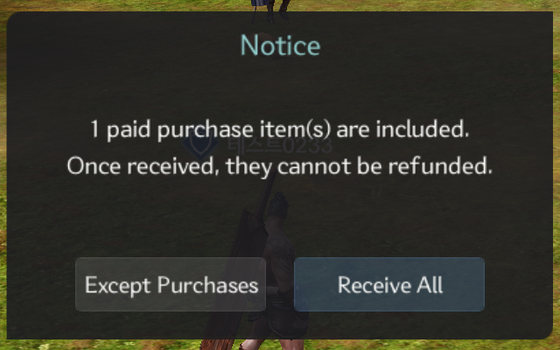
- If you tap Receive All while the Mailbox has purchases from the last 7 days, a confirmation appears. Tap Except Purchases to leave the purchases in the Mailbox.
- Leave the purchase uncollected and ask the store for a refund using the links below.
Where to ask
| Paid through | Where to ask |
|---|---|
| Google Play (Android, Google Play Games on PC) | Google Play refund help |
| App Store (iPhone, iPad) | reportaproblem.apple.com |
| Steam | Steam Support |
- Each store has its own time limits and conditions, and the store tells you the result.
- To find your order number, see I Paid but Didn't Get My Item.
Our Terms
As our Terms and Conditions state, all sales of virtual money and virtual goods are final, and we do not refund purchases ourselves. Players living in the EU: see the Terms for EU Residents.
Need help?
To check whether a purchase was delivered, contact Support → Payments with the character you paid with and the order number.